

Character LCD Display: Top Choices for Your Project's Interface
2026-04-07
When it comes to selecting the perfect interface for your hardware project, Character LCD displays stand out as versatile and cost-effective solutions. In this post, we’ll dive into top picks that can enhance your project’s usability and aesthetics. For reliable options, consider exploring Jingda-Display, known for quality and innovative designs. Whether you’re a hobbyist or a professional, these displays offer clarity and simplicity, making them ideal for various applications. Let’s uncover which models might best suit your needs and how they can transform your interface experience.
Understanding Character LCD Specifications for Optimal Project Selection
When you're diving into a project that requires a character LCD, it's easy to get overwhelmed by the technical jargon. But getting a handle on the specs isn't just about ticking boxes—it's about making sure your display actually fits your needs without overcomplicating things or blowing your budget. Start by considering the basics: things like the number of characters per line and lines per display can dictate how much information you can show at once, which is crucial for anything from a simple temperature readout to a more complex menu system. Don't just go for the biggest screen; think about readability in your specific environment and whether a standard 16x2 or a larger 20x4 might serve you better without wasting space or power.
Beyond the obvious size, delve into the interface options available with character LCDs. Many hobbyists default to using an I2C or SPI backpack to simplify wiring, but if you're working on a high-speed or noise-sensitive application, a direct parallel interface might offer better control and reliability. Also, check the operating voltage—3.3V vs. 5V can make or break compatibility with your microcontroller, so match this to your existing setup to avoid extra circuitry. Pay attention to the viewing angle and contrast adjustment too; a display that's hard to read from different angles or in varying light conditions can frustrate users, so look for models with good adjustability or built-in backlighting that suits your project's lighting environment.
Finally, don't overlook the less flashy specs that can impact long-term performance. Consider the response time and temperature range, especially if your project will be used outdoors or in industrial settings where delays or failure under extreme conditions could be problematic. Also, evaluate the power consumption if you're running on batteries or aiming for energy efficiency—some displays sip power while others drain it quickly. By weighing these factors against your project's goals, you'll not only pick a display that works reliably but also one that enhances the overall user experience, making your selection process a thoughtful step toward a polished final product.
Key Performance Factors to Evaluate Before Purchasing a Character LCD
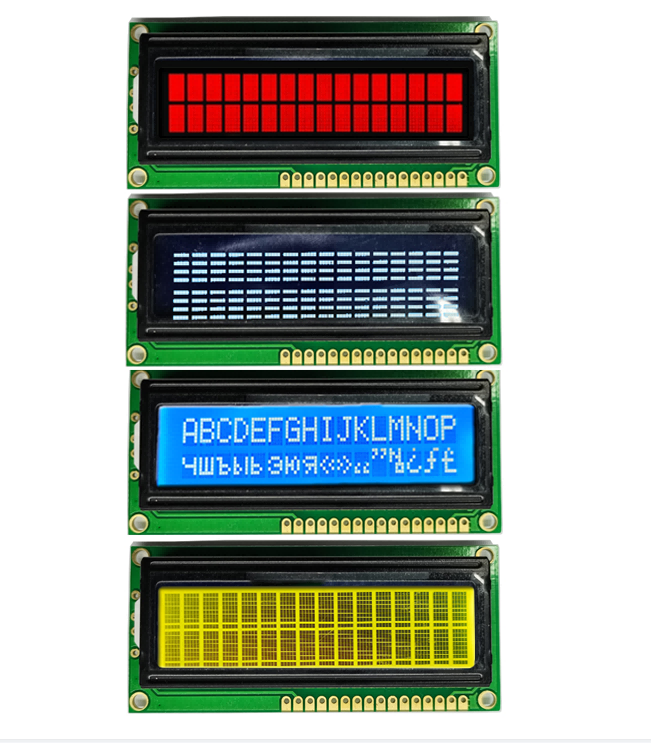
When shopping for a character LCD, it's crucial to dig into the display's readability under various conditions. A standout feature to check is the contrast ratio, which isn't just about brightness but how the characters pop against the background. In dimly lit workshops or under direct sunlight, a display with adjustable backlighting and high contrast can make all the difference, ensuring your data remains crystal-clear without causing eye strain during long-term use.
Another key aspect is viewing angle—often overlooked, it determines how well the screen performs from different positions. Unlike generic specs, you'll want to test this in real-world scenarios, like mounted panels viewed from an angle. Opt for models with wide viewing angles, as they maintain legibility for multiple users, preventing frustrating misinterpretations of critical information in collaborative environments.
Don't forget the interface and power efficiency; these can streamline integration and reduce operational costs. Look for LCDs with versatile protocols or low-power modes tailored to your application's demands, ensuring seamless communication with your hardware and enhancing overall system reliability without unnecessary energy drain.
Common Applications and Creative Uses for Character LCD Displays
Character LCD displays have become a staple in countless devices, from simple home appliances to complex industrial systems. You'll often find them in digital clocks, microwave ovens, and thermostats, providing clear, text-based feedback without the complexity of graphical interfaces. In the automotive sector, they're used in dashboard indicators and infotainment systems, offering reliable performance under varying conditions. Their low power consumption and durability make them ideal for portable gadgets like handheld scanners and GPS units, where efficiency and readability are key.
Beyond everyday applications, these displays spark creativity in DIY projects and hobbyist circles. Makers frequently integrate character LCDs into custom weather stations, home automation dashboards, and retro gaming consoles, adding a nostalgic or functional touch. Artists might incorporate them into interactive installations to display poetic messages or real-time data, blending technology with art. In educational settings, they serve as hands-on tools for teaching electronics and programming, allowing students to visualize outputs from microcontrollers like Arduino or Raspberry Pi in a tangible way.
Looking forward, the versatility of character LCD displays continues to inspire innovative uses that push beyond traditional boundaries. In niche fields, they're employed in specialized equipment such as medical monitors and scientific instruments, where precision text display is crucial. Creative entrepreneurs have even turned them into minimalist digital signage for small businesses, offering an affordable alternative to more complex screens. As technology evolves, their simplicity remains a strength, fostering applications in areas like smart home controls and wearable tech, where compact, low-cost interfaces are in high demand.
Installation Tips for Seamless Integration of Character LCD Modules
When you're setting up a character LCD module, it's essential to start with a clean slate. Ensure all components are properly aligned and secured before powering on—this simple step helps avoid common issues like flickering or ghosting. Use quality connectors to prevent signal loss, and always double-check the pin configurations against your controller's datasheet to avoid any wiring mishaps.
For a smoother integration process, consider the environment where the LCD will operate. Temperature and humidity can impact performance, so if it's going into a high-heat or damp setting, adding protective measures like conformal coating might be wise. Don't forget to test the contrast and backlight settings thoroughly, as adjusting these on the fly can lead to inconsistent displays, which users might find frustrating.
Finally, incorporate user feedback loops during the installation phase. By running a few basic display tests—like scrolling text or changing screens—you can catch any latency or readability issues early. It's a hands-on approach that not only ensures functionality but also enhances the overall user experience, making your setup feel more polished and reliable from the get-go.
Maintenance Practices to Extend the Lifespan of Character LCD Screens
Wondering how to keep your character LCD screens running smoothly for years? It starts with simple habits that anyone can adopt. First, avoid exposing the screens to extreme temperatures—both intense heat and cold can stress the components, leading to faster wear. Instead, store and use them in stable, moderate environments, like typical room conditions, to help prevent material breakdown and ensure the display stays crisp without extra strain.
Another key aspect is handling the screen gently during cleaning and operation. Fingerprints and dust can accumulate over time, but using a soft, lint-free cloth with a bit of mild cleaning solution—never harsh chemicals—makes all the difference. Rub softly in circular motions to avoid scratching the surface or damaging the delicate pixels underneath, keeping the characters legible and the screen looking fresh without risking internal damage from abrasive touches.
Lastly, be mindful of how you power and use the display. Turning it off when not in use reduces electrical stress and conserves its life, while avoiding prolonged static images prevents burn-in that can mar the screen permanently. By integrating these easy routines, you'll not only maintain clarity and function but also extend your LCD's reliable service well beyond the average lifespan, making it a worthwhile investment in both time and care.
Comparing Price and Value Across Popular Character LCD Brands
When diving into the world of character LCDs, it's easy to get caught up in brand names like Samsung, Hitachi, or Optrex, but the real secret lies in balancing upfront cost with long-term value. Sure, a budget-friendly screen from a lesser-known manufacturer might save you a few dollars initially, but if it flickers after a year or lacks support, you're stuck troubleshooting while your project stalls. On the flip side, premium brands often come with robust warranties and proven reliability, meaning fewer headaches down the line. Think about it—paying a bit more upfront could mean smoother integration, better contrast ratios, and modules that just work, turning a simple display into a dependable component.
Let's break it down practically: for hobbyists or small-scale prototypes, brands like Newhaven Display or CrystalFontz offer solid entry points without breaking the bank. Their screens might not have the flashiest specs, but they deliver consistent performance for basic applications, making them a smart pick if you're on a tight budget. Conversely, in industrial settings where downtime costs a fortune, investing in a Hitachi HD44780-compatible module from a reputable supplier can be a game-changer. These units often feature wider temperature ranges and higher durability, ensuring they withstand harsh environments while maintaining readability. It's not just about the price tag; it's about matching the LCD's capabilities to your specific needs, avoiding overspending on features you won't use or skimping on essentials.
Ultimately, the best approach is to look beyond the sticker price and consider factors like compatibility, ease of use, and community support. For instance, some brands excel in Arduino integrations with extensive libraries, saving you coding hours, while others might shine in custom configurations for specialized equipment. By weighing these aspects against your budget, you can snag a display that not only fits your wallet but also enhances your project's success, turning a simple comparison into a strategic advantage. Remember, in the realm of character LCDs, value isn't just what you pay—it's what you gain in reliability and peace of mind.
FAQ
Character LCD displays are ideal for projects requiring simple text or numeric output, such as embedded systems, IoT devices, robotics, DIY electronics, and industrial control panels, where clear, low-power alphanumeric communication is needed without complex graphics.
A character LCD displays fixed fonts in rows and columns, like a digital typewriter, focusing on text and basic symbols, while a graphical LCD can render custom images, shapes, and varied fonts, offering more versatility for visual interfaces but often at higher cost and complexity.
Consider factors like display size (e.g., 16x2 or 20x4 characters), interface type (e.g., parallel or I2C/SPI for easier wiring), voltage requirements, viewing angle, backlight options (e.g., LED or EL for readability), cost, and compatibility with your microcontroller or development board.
Yes, many character LCDs are available with ruggedized features such as wide temperature ranges, waterproofing, and anti-glare coatings, making them suitable for outdoor or industrial settings, though it's best to check specific product ratings for durability against moisture and dust.
Interfacing typically involves connecting data pins, control pins, and power, using libraries like LiquidCrystal for Arduino or direct GPIO for Raspberry Pi; options include parallel mode for speed or serial interfaces like I2C to save pins, with online tutorials providing step-by-step guidance.
Beyond standard text, creative uses include scrolling messages, custom character creation for icons or simple animations, integrating sensors to show real-time data (e.g., temperature or time), and combining with buttons or encoders for interactive menus in projects like weather stations or game consoles.
Common pitfalls include incorrect wiring leading to garbled text, forgetting to adjust contrast with a potentiometer for visibility, not accounting for power consumption with backlight, and overlooking library compatibility issues; testing with sample code can help mitigate these problems early on.
Advancements like lower power consumption, smaller footprints, and improved interfaces (e.g., from parallel to serial) have made character LCDs more accessible and efficient, enabling sleek designs in compact devices while maintaining reliability, though they now often complement or get replaced by OLEDs in high-end applications.
Conclusion
When selecting a character LCD display for your project's interface, it's crucial to start by understanding key specifications like size, resolution, and backlighting to ensure compatibility and optimal performance. Evaluating factors such as viewing angles, contrast ratios, and power consumption can help you make an informed purchase, avoiding common pitfalls that might hinder your project's functionality. By comparing popular brands, you'll find that value often extends beyond price, with durability and support playing significant roles in long-term satisfaction.
Once integrated, character LCDs shine in diverse applications, from industrial controls to creative DIY projects, offering reliable output with proper installation and minimal maintenance. Following tips for seamless integration, such as ensuring correct wiring and firmware setup, can prevent issues, while regular cleaning and avoiding extreme conditions prolong the screen's lifespan. Ultimately, a well-chosen character LCD not only enhances user interaction but also proves to be a cost-effective and versatile component for any interface, blending practicality with innovation.
Contact Us
Contact Person: Vincent
Email: [email protected]
Tel/WhatsApp: 86 135 5485 1379
Website: https://www.jda-display.com/